Showing posts with label Microsoft SQL Server. Show all posts

Microsoft SQL Server VS Oracle

There are many different relational database management systems (RDBMS) out there. You have probably heard about Microsoft Access, Sybase, and MySQL, but the two most popular and widely used is Oracle and MS SQL Server.  Although there are many similarities between the two platforms, there are also a number of key differences. In this blog, I will be taking a look at several in particular, in the areas of their command language, how they handle transaction control and their organization of database objects.

Language

Perhaps the most obvious difference between the two RDBMS is the language they use. Although both systems use a version of Structured Query Language or SQL, MS SQL Server uses Transact SQL, or T-SQL, which is an extension of SQL originally developed by Sybase and used by Microsoft. Oracle, meanwhile, uses PL/SQL, or Procedural Language/SQL. Both are different “flavors” or dialects of SQL and both languages have different syntax and capabilities. The main difference between the two languages is how they handle variables, stored procedures, and built-in functions. PL/SQL in Oracle can also group procedures together into packages, which can’t be done in MS SQL Server. In my humble opinion, PL/SQL is complex and potentially more powerful, while T-SQL is much more simple and easier to use.

Transaction Control

Another one of the biggest differences between Oracle and MS SQL Server is transaction control. For the purposes of this article, a transaction can be defined as a group of operations or tasks that should be treated as a single unit. For instance, a collection of SQL queries modifying records that all must be updated at the same time, where (for instance) a failure to update any single records among the set should result in none of the records being updated. By default, MS SQL Server will execute and commit each command/task individually, and it will be difficult or impossible to roll back changes if any errors are encountered along the way. To properly group statements, the “BEGIN TRANSACTION” command is used to declare the beginning of a transaction, and either a COMMIT statement is used at the end. This COMMIT statement will write the changed data to disk, and end the transaction. Within a transaction, ROLLBACK will discard any changes made within the transaction block. When properly used with error handling, the ROLLBACK allows for some degree of protection against data corruption. After a COMMIT is issued, it is not possible to roll back any further than the COMMIT command.

Within Oracle, on the other hand, each new database connection is treated as a new transaction. As queries are executed and commands are issued, changes are made only in memory and nothing is committed until an explicit COMMIT statement is given (with a few exceptions related to DDL commands, which include “implicit” commits, and are committed immediately). After the COMMIT, the next command issued essentially initiates a new transaction, and the process begins again. This provides greater flexibility and helps for error control as well, as no changes are committed to disk until the DBA explicitly issues the command to do so.

Organization of Database Objects

The last difference I want to discuss is how the RDBMS organizes database objects. MS SQL Server organizes all objects, such as tables, views, and procedures, by database names. Users are assigned to a log in which is granted accesses to the specific database and its objects. Also, in SQL Server each database has a private, unshared disk file on the server. In Oracle, all the database objects are grouped by schemas, which are a subset collection of database objects and all the database objects are shared among all schemas and users. Even though it is all shared, each user can be limited to certain schemas and tables via roles and permissions.

In short, both Oracle and SQL Server are powerful RDBMS options. Although there are a number of differences in how they work “under the hood,” they can both be used in roughly equivalent ways. Neither is objectively better than the other, but some situations may be more favorable to a particular choice. Either way, Segue can support these systems and help to make recommendations on how to improve, upgrade, or maintain your key mission-critical infrastructure to make sure that you can keep your focus on doing business.

Cursor in SQL Server

In SQL procedures, a cursor make it possible to define a result set (a set of data rows) and performs complex logic on a row by row basis. By using the same mechanics, an SQL procedure can also define a result set and return it directly to the caller of the SQL procedure or to a client application.

A cursor can be viewed as a pointer to one row in a set of rows. The cursor can only reference one row at a time, but can move to other rows of the result setas needed.

To use cursors in SQL procedures, you need to do the followings:

  • Declare a cursor that defines a result set.
  • Open the cursor to establish the result set.
  • Fetch the data into local variables as needed from the cursor, one row at atime.
  • Close the cursor when done.
Example:

DECLARE @fName varchar(50), @lName varchar(50)
DECLARE cursorName CURSOR -- Declare cursor
LOCAL SCROLL STATIC

FOR

Select firstName, lastName FROM myTable

  OPEN cursorName -- open the cursor

     FETCH NEXT FROM cursorName
     INTO @fName, @lName
     PRINT @fName + ' ' + @lName -- print the name

     WHILE @@FETCH_STATUS = 0

        BEGIN

           FETCH NEXT FROM cursorName
           INTO @fName, @lName
           PRINT @fName + ' ' + @lName -- print the name

        END

  CLOSE cursorName -- close the cursor

DEALLOCATE cursorName -- Deallocate the cursor

Maintenance Plan Wizard in SQL Server Management Studio, SQ: Server 2008

The Maintenance Plan Wizard creates a maintenance plan that Microsoft SQL Server Agent can run on a regular basis. This allows you to perform various database administration tasks, including backups, run database integrity checks, or update database statistics at specified intervals.

To create or manage maintenance plans, you must be a member of the sysadmin fixed server role. Object Explorer only displays the Maintenance Plans node for users who are members of the sysadmin fixed server role.

To start the Maintenance Plan Wizard, do the followings:
  • Expand the server.
  • Expand the Management folder.
  • Right-click Maintenance Plans and select Maintenance Plan Wizard. This launches the wizard and you can now step through and create a plan customized to meet your maintenance requirements.

Script for Delete Stranded User Activity in Microsoft SQL Server

In this article, we will going to use a script to delete the activity table records for a specific stranded user in Dynamics GP. This will enable us not to have all the users log out of GP in order to execute these scripts. This is typically handy when we have many users signed into the system from various regions and its a tough job to have all the users sign off the system for this maintenance to be done. Please make sure that you must take a back up of DYNAMICS database before you execute this script.


DECLARE @USERID CHAR(15)
DECLARE @CMPNYNAM CHAR(30)

SET @USERID = 'testuser'
SET @CMPNYNAM = 'Fabrikam, Inc.'

/*Deleting the user record from the DEX_LOCK table*/
DELETE FROM tempdb.dbo.DEX_LOCK
WHERE session_id = ( SELECT SQLSESID
FROM DYNAMICS.dbo.ACTIVITY
WHERE USERID = @USERID
AND CMPNYNAM = RTRIM(@CMPNYNAM)
)

/*Deleting the user record from the DEX_SESSION table*/
DELETE FROM tempdb.dbo.DEX_SESSION
WHERE session_id = ( SELECT SQLSESID
FROM DYNAMICS.dbo.ACTIVITY
WHERE USERID = @USERID
AND CMPNYNAM = RTRIM(@CMPNYNAM)
)

/*Deleting the user record from the SY00801 table*/
DELETE FROM DYNAMICS.dbo.SY00801
WHERE USERID = @USERID
AND CMPANYID = ( SELECT CMPANYID
FROM DYNAMICS.dbo.SY01500
WHERE CMPNYNAM = RTRIM(@CMPNYNAM)
)

/*Deleting the user record from the SY00800 table*/
DELETE FROM DYNAMICS.dbo.SY00800
WHERE USERID = @USERID
AND CMPNYNAM = RTRIM(@CMPNYNAM)

/*Deleting the user record from the ACTIVITY table*/
DELETE FROM DYNAMICS.dbo.ACTIVITY
WHERE USERID = @USERID
AND CMPNYNAM = RTRIM(@CMPNYNAM)

How To Detect SQL Server 2005 Instances Installed on a Single Machine


Have you ever wondered if there is a programmatic way to detect all the SQL Server instances on a single machine? Well, no worries, copy the following code given below and save it as SQLInfo.Vbs and run this script using C:\CScript SQLInfo.Vbs or just dobule click on the script.

Contents of SQLInfo.Vbs:
strComputer = "."
Set objWMIService = GetObject("winmgmts:\\" & strComputer & "\root\Microsoft\SqlServer\ComputerManagement")
Set colItems = objWMIService.ExecQuery( "SELECT * FROM SqlService",,48)
For Each objItem in colItems
      Wscript.Echo "-----------------------------------"
      Wscript.Echo "SqlService instance"
      Wscript.Echo "-----------------------------------"
      Wscript.Echo "DisplayName: " & objItem.DisplayName
      Wscript.Echo "ServiceName: " & objItem.ServiceName
      Wscript.Echo "SQLServiceType: " & objItem.SQLServiceType
Next

WMI configuration error in SQL Server System Configuration Check

Select following text from "@echo on" to ":End" and copy into notepad. Then Save As "fixwmi.cmd" or "fixwmi.bat" in "C:\" and then from run command, type "CMD" then press Enter, from command line type "C:\fixwmi.cmd" or "C:\fixwmi.bat" and press Enter.

It takes several minutes to complete and at points it appears that it is not running but it is. After it is complete, you see the ":END" statement then start the SQL server installation again. Also, don't forget to add yourself as follower of this blog, thanks.

Contents of FIXWMI.CMD

@echo on
cd /d c:\temp
if not exist %windir%\system32\wbem goto TryInstall
cd /d %windir%\system32\wbem
net stop winmgmt
winmgmt /kill
if exist Rep_bak rd Rep_bak /s /q
rename Repository Rep_bak
for %%i in (*.dll) do RegSvr32 -s %%i
for %%i in (*.exe) do call :FixSrv %%i
for %%i in (*.mof,*.mfl) do Mofcomp %%i
net start winmgmt
goto End

:FixSrv
if /I (%1) == (wbemcntl.exe) goto SkipSrv
if /I (%1) == (wbemtest.exe) goto SkipSrv
if /I (%1) == (mofcomp.exe) goto SkipSrv
%1 /RegServer

:SkipSrv
goto End

:TryInstall
if not exist wmicore.exe goto End
wmicore /s
net start winmgmt
:End

NOTE: Administrator privileges might be required to run this script.

How to Kill Processes That Have Open Connection in a SQL Server

You may frequently need in especially development and test environments instead of the production environments to kill all the open connections to a specific database in order to process maintainance task over the SQL Server database.
In such situations when you need to kill or close all the active or open connections to the SQL Server database, you may manage this task by using the Microsoft SQL Server Management Studio or by running t-sql commands or codes. Actually, this task can be thought as a batch task to kill sql process running on a SQL Server.

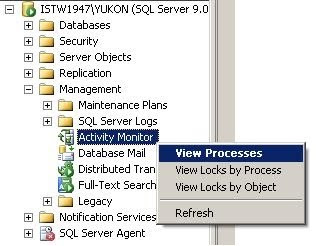
If you open the SQL Server Management Studio and connect to a SQL Server instance you will see the Activity Monitor object in the Object Explorer screen of the related database instance. You can double click the Activity Monitor object or right click to view the context menu and then select a desired item to display the activities to be monitored on the Activity Monitor screen.


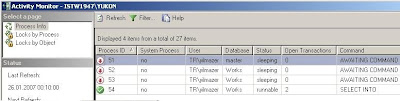
 As seen on below you can monitor and view process id's and process details on the list of prcesses running on the database instance. If you want you can filter processes based on specific values like user, database or status.

Note that default view when displayed the screen is first opened is filtered only for non-system processes which means system processes which own the first 50 reserved processid's are not listed in the view by default. You can view system processes by removing the filter on "Show System Processes" criteria in the filter settings screen.


 SQL Server 2005 SQL Server Management Studio Activity Monitor screen

You can kill a process by a right click on the process in the grid and selecting the Kill Process menu item. You will be asked for a confirmation to kill the related process and then will kill the open connection to the database over this process. This action is just like running to kill sql process t-sql command for a single process.

A second method which I do not recommend but can be used in some situations may be using the Detach Database screen to drop connections and detaching the database and then re-attaching the database.

By: http://www.kodyaz.com/

Find Field Value in Database in Microsoft SQL Server


The following is a SQL Script that can be run in a database to return all tables and columns where a particular value is present. This can be used for strings or values with a small modification.
This type of thing is great when moving applications/products between servers. This is certainly a good script to include in your master table to be used over and over.


SQL Command:

DECLARE @value VARCHAR(64)
DECLARE @sql VARCHAR(1024)
DECLARE @table VARCHAR(64)
DECLARE @column VARCHAR(64)

SET @value = 'valuehere'

CREATE TABLE #t (
    tablename VARCHAR(64),
    columnname VARCHAR(64)
)

DECLARE TABLES CURSOR
FOR

    SELECT o.name, c.name
    FROM syscolumns c
    INNER JOIN sysobjects o ON c.id = o.id
    WHERE o.type = 'U' AND c.xtype IN (167, 175, 231, 239)
    ORDER BY o.name, c.name

OPEN TABLES

FETCH NEXT FROM TABLES
INTO @table, @column

WHILE @@FETCH_STATUS = 0
BEGIN
    SET @sql = 'IF EXISTS(SELECT NULL FROM [' + @table + '] '
    --SET @sql = @sql + 'WHERE RTRIM(LTRIM([' + @column + '])) = ''' + @value + ''') '
    SET @sql = @sql + 'WHERE RTRIM(LTRIM([' + @column + '])) LIKE ''%' + @value + '%'') '
    SET @sql = @sql + 'INSERT INTO #t VALUES (''' + @table + ''', '''
    SET @sql = @sql + @column + ''')'

    EXEC(@sql)

    FETCH NEXT FROM TABLES
    INTO @table, @column
END

CLOSE TABLES
DEALLOCATE TABLES

SELECT *
FROM #t

DROP TABLE #t

Find any Column from any Table of any Database in Microsoft SQL Server


There may be some instance where in you need to know in how many table the column exist, this is useful query for the DBA to find the specified Column in a given database.

SQL Command:

SELECT name as Table_Name,
case when xtype = 'U' then 'Table'
      else 'View'
      end Type
FROM sysobjects WHERE id IN ( SELECT id FROM syscolumns WHERE name = 'ITEMNMBR')
and xtype = 'U'
order by name

Find Table Size of the Database in Microsoft SQL Server

Very useful script for DBA to know the each table size of a specified database.

SQL Command: 

DECLARE
@id int,
@pages int,
@objname varchar(750)

SET NOCOUNT ON

CREATE TABLE #tblSize
(
Name varchar (100),
Rows varchar (100),
Reserved varchar (100),
Data varchar (100),
Index_Size varchar (100),
Unused varchar (100)
)

CREATE TABLE #spt_space
(
rows int null,
reserved dec(15) null,
data dec(15) null,
indexp dec(15) null,
unused dec(15) null
)

-- declare main cursor to get first user table name from sysobjects
DECLARE TabNameCur CURSOR FOR
SELECT id, name
FROM dbo.sysobjects
WHERE xtype = 'u'
ORDER BY name


OPEN TabNameCur
FETCH TabNameCur INTO @id, @objname

WHILE @@FETCH_STATUS = 0
BEGIN

TRUNCATE TABLE #spt_space

INSERT INTO #spt_space (reserved)
SELECT sum(reserved)
FROM sysindexes
WHERE indid in (0, 1, 255)
AND id = @id

SELECT @pages = sum(dpages)
FROM sysindexes
WHERE indid < 2
AND id = @id

SELECT @pages = @pages + isnull(sum(used), 0)
FROM sysindexes
WHERE indid = 255
AND id = @id

UPDATE #spt_space
SET data = @pages

UPDATE #spt_space
SET indexp = (SELECT sum(used)
FROM sysindexes
WHERE indid in (0, 1, 255)
AND id = @id) - data

UPDATE #spt_space
SET unused = reserved
- (SELECT sum(used)
FROM sysindexes
WHERE indid in (0, 1, 255)
AND id = @id)

UPDATE #spt_space
SET rows = i.rows
FROM sysindexes i
WHERE i.indid < 2
AND i.id = @id

--This step required as 'convert.../1000' cannot be used with varchars
INSERT INTO #tblSize
SELECT name = object_name(@id),
rows, --= convert(char(11), rows),
reserved = convert(decimal (8,2), (reserved * d.low / 1024.)/1000),
data = convert(decimal (8,2), (data * d.low / 1024.)/1000),
index_size = convert(decimal (8,2), (indexp * d.low / 1024.)/1000),
unused = convert(decimal (8,2), (unused * d.low / 1024.)/1000)
FROM #spt_space, master.dbo.spt_values d
WHERE d.number = 1
AND d.type = 'E'

FETCH NEXT FROM TabNameCur INTO @id, @objname
END

-- close & deallocate main cursor
CLOSE TabNameCur
DEALLOCATE TabNameCur


SELECT Name, Rows,
Reserved + ' MB' as Reserved,
Data + ' MB' as Data,
index_size + ' MB' as Index_Size,
unused + ' MB' as Unused
FROM #tblSize